
Breakfast
Homemade, fresh breakfast served with warmth and a view.
Welcome to Mei Tai! To help you make the most of your stay, we've gathered our favorite local activities, restaurants, and essential information about the finca.


You need an official SINAC barcode to enter Parque Nacional Volcán Tenorio. The website can be slow and sometimes mixes English and Spanish, but this guide shows exactly where to go. One person can reserve for the whole group.
Have these ready before you begin
If SINAC looks stuck
Tap or click once, then wait. Ticket types and terms can take several seconds to appear. Do not keep tapping, refresh, or press Back while it is working. If a session fails before payment, reopen SINAC in a private/incognito window and try again.
Use the official link above. On the first screen, select Create an account (or Crear una cuenta).
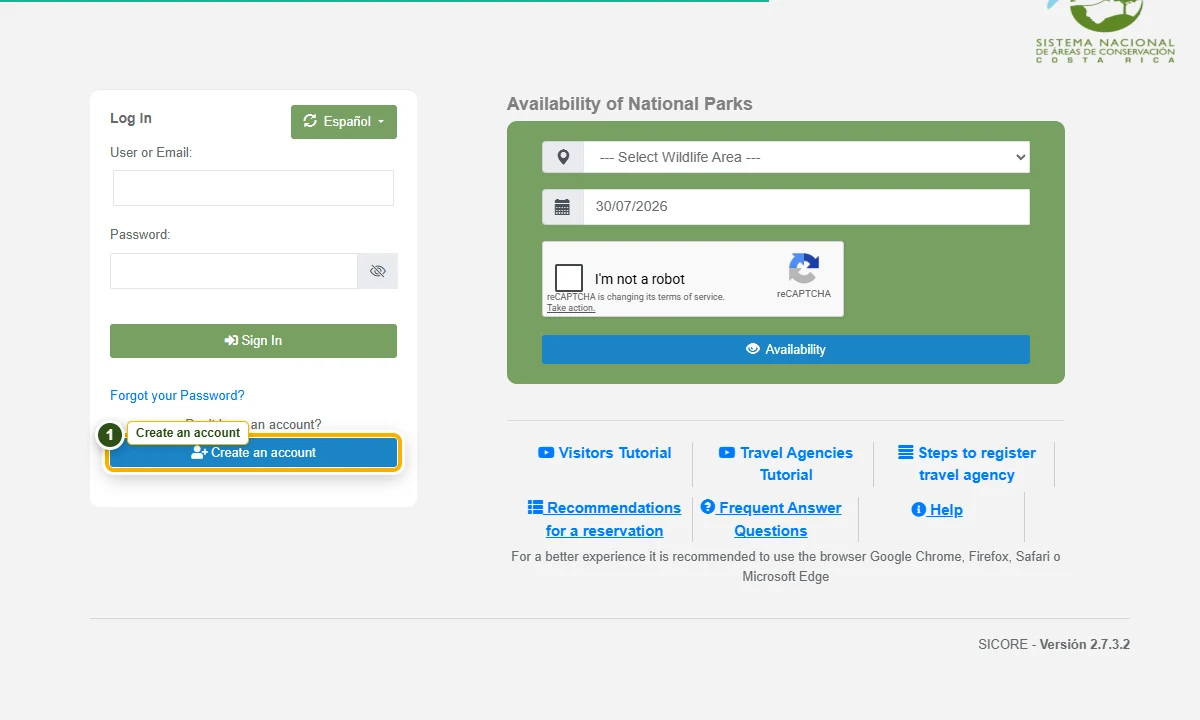
The screenshot could not load, but the written step still works: choose “Create an account” on the SINAC home page.
Choose a username that nobody else has used—adding a few numbers can help. Enter your name and an email address you can access now.
You do not need a separate account for every traveler.
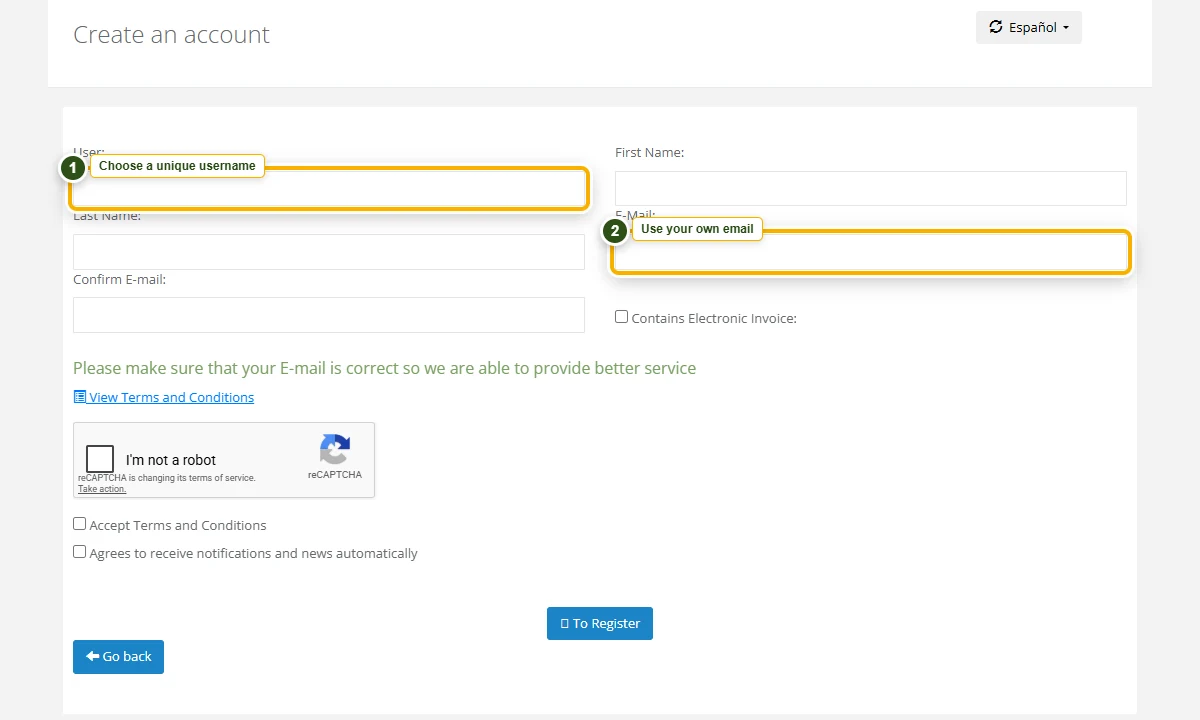
The screenshot could not load. Enter a unique username, your name, and your email in the account form.
Unless you specifically need a Costa Rican tax invoice, do not select Electronic Invoice / Factura Electrónica. SINAC may show this option during account setup and again at payment. Then accept the terms, complete “I’m not a robot,” and register.
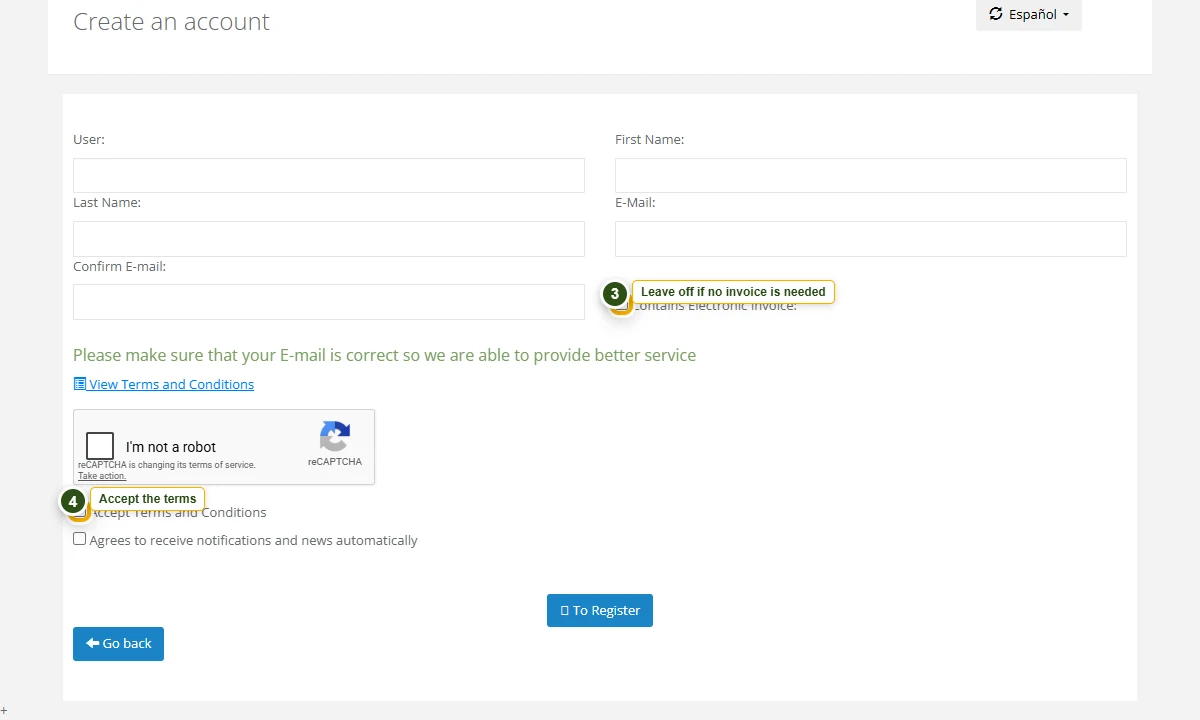
The screenshot could not load. Leave electronic invoicing off if you do not need it, then accept the terms and complete the robot check.
Check your inbox and spam folder for SINAC’s temporary password. Return to the SINAC home page and sign in with your chosen username and that temporary password.
Change it to a personal password when prompted. Save the new password, return to the SINAC home page again, and sign in with your username and new password before buying tickets.
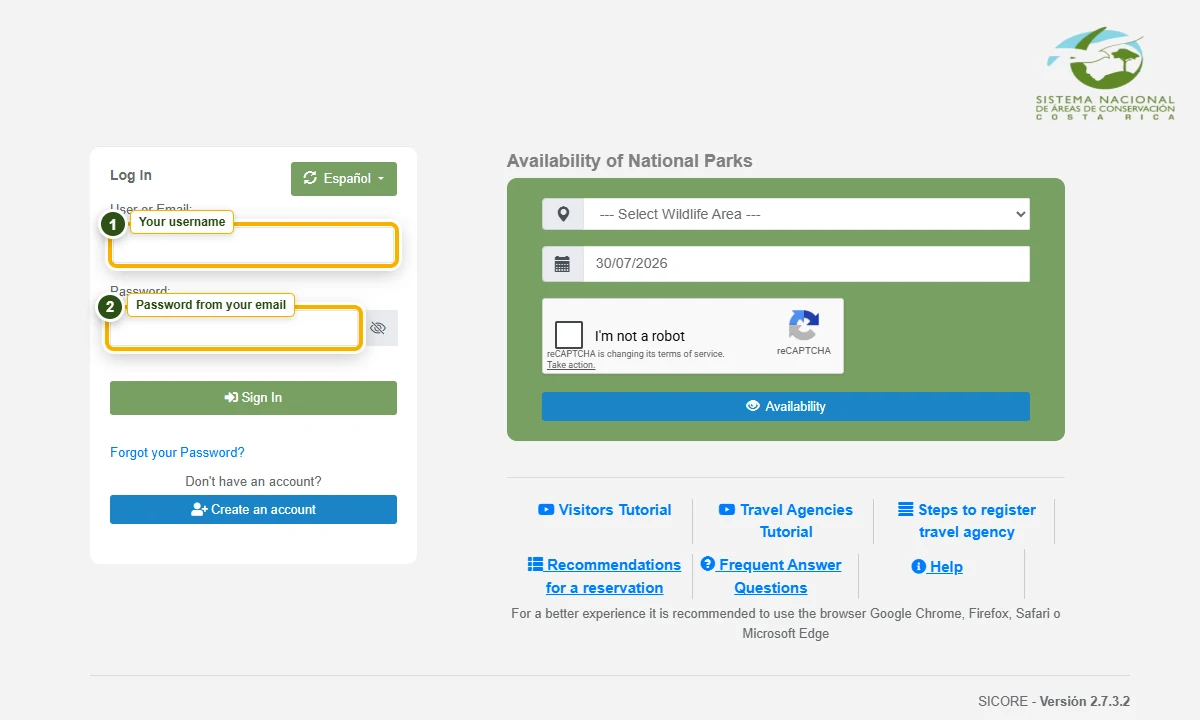
The screenshot could not load. Use the login box on the SINAC home page with your username and emailed password.
After signing in, open Buy and choose Online Reservation. On a phone, tap the green Menu button first.
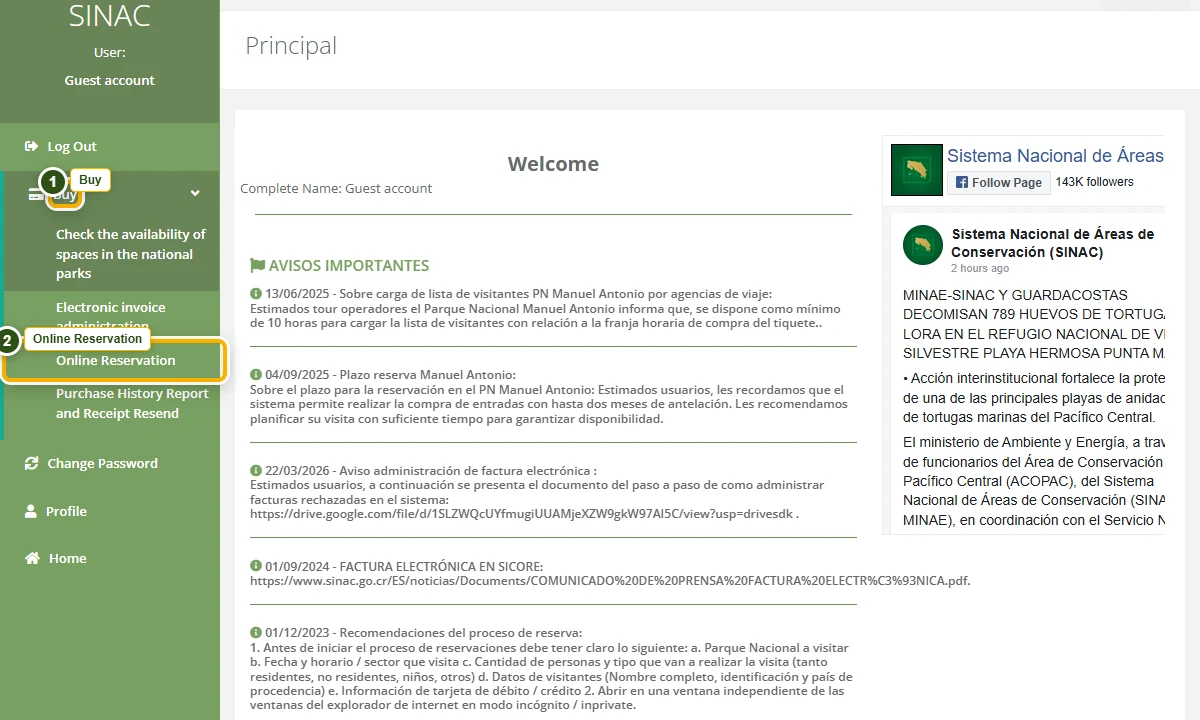
The screenshot could not load. In the signed-in menu, open “Buy” and then “Online Reservation.”
Río Celeste is inside Volcán Tenorio National Park. Find Parque Nacional Volcán Tenorio and choose Make Reservation.
Do not look for a park named “Río Celeste.”

The screenshot could not load. In the park list, choose “Parque Nacional Volcán Tenorio.”
Select your visit date first. Wait for SINAC to load the available entry times, then choose one. Arrive during the time window shown on your ticket.
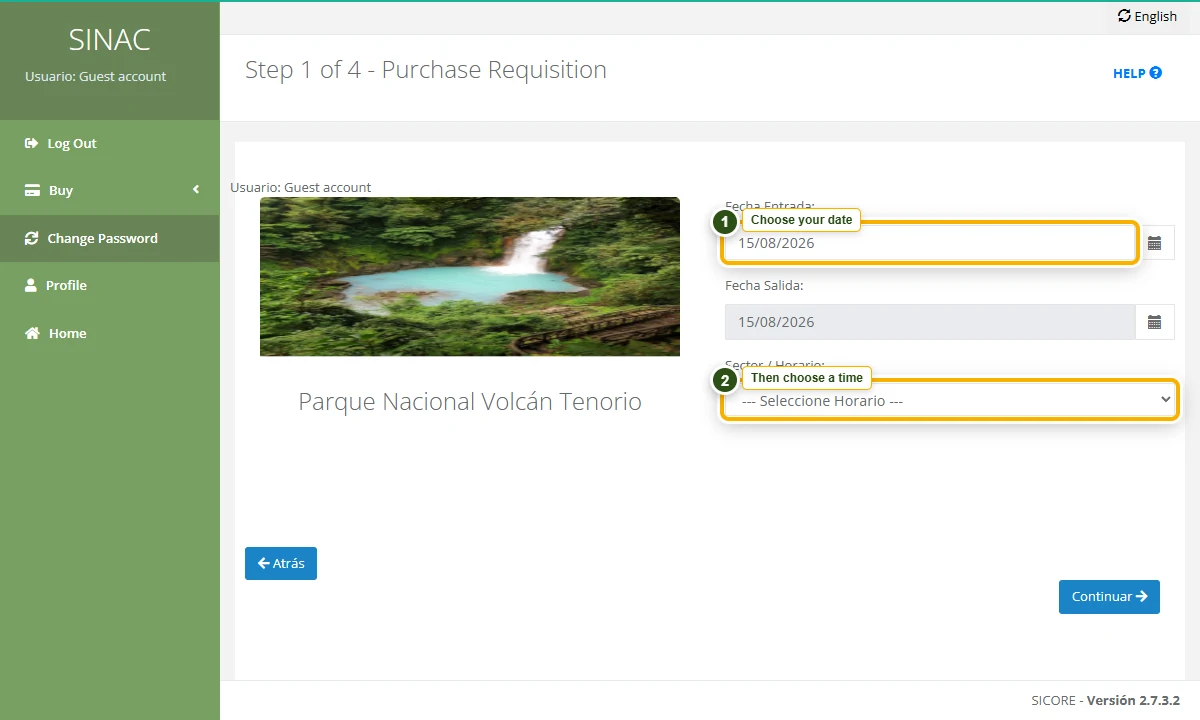
The screenshot could not load. Choose the visit date, wait for the time options, and then choose an entry time.
Choose National / Resident or Non-resident / Foreigner, then the correct adult, child, or toddler ticket for each person. One account can add the whole group, up to 10 Tenorio tickets in one purchase.
Wait for the terms to load, read and accept them, then continue. SINAC will hold the tickets and start a 12-minute countdown for the rest of the purchase.
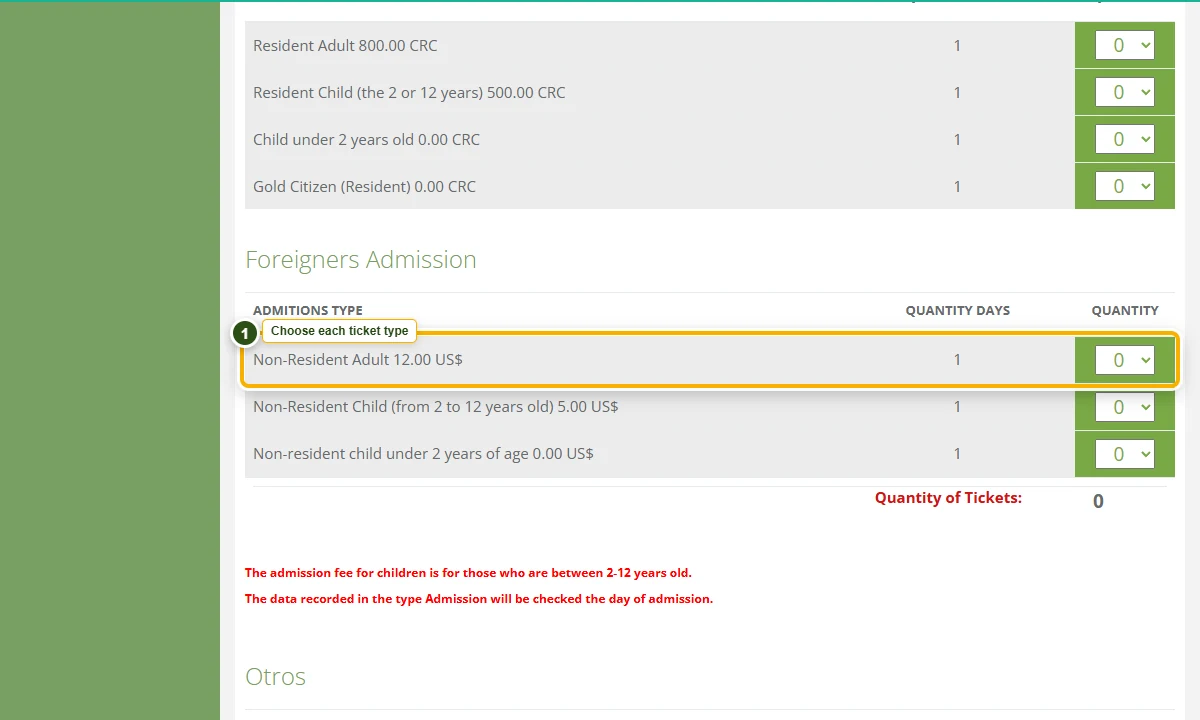
The screenshot could not load. Choose the quantity beside each correct visitor category, accept the terms, and continue.
SINAC gives you 12 minutes. Follow its timer, then check the name, park, date, entry time, and visitor count.
For every visitor, enter the name and passport or ID. On a phone, swipe left inside the visitor table. On a computer, move its scrollbar right until Country / Nationality appears.
Nationality is required and may be hiddenEnter the email, phone, address, name on the card, card number, expiration month and year, CVC / CVV, and currency. Recheck before confirming.
Important: remove the Electronic Invoice checkmarkScreenshot the comprobante number in case the email is delayed. In the email, look below the green banner. If no barcode appears, open or download the image. Show it at the park entrance and bring the same ID.
Keep this page open and return to the matching step whenever you need it.
Password email missing? Check spam first. SINAC’s official reservation address is reservaciones.sinac@sinac.go.cr. If you get stuck while staying with us, show us the screen before repeating a payment.
Swipe to move around a computer screenshot. You can also pinch to zoom where your browser allows it.
Tip: Before booking tours or activities directly, please check with us first. We often have better rates and can help ensure availability.


